My semi-clear goals
Starting a blog wasn't my new-years resolution but I was influenced to do it by these two pieces of content I consumed (kind of ironic) right before my Christmas break. First it was this podcast from an indie developer pushing the narrative to produce more and consume less. And second was this small blog from Drew Breunig on why everyone should write more.
I was never good at writing, not in school and not in university. I became aware of this more at work. I can (sometimes) make interesting decks and get my point across that way. I use (my self-deprecating) humour, some neatly organised slides and my exotic Georgian English accent to somehow get people (with short attention spans) to pay attention to what I am trying to communicate.
But I was always jealous of the people who could write engaging, concise docs because they had concepts they were talking about better internalised.
So that's where my motivation is coming from:
- I want to create more (writing, building, music) this year
- I want to get better at writing
So, building a blog on my personal website felt like a good start! And Claude Code on vacation to help me out.
My Requirements
While I know nothing about blogging (I missed that internet era, I was too young or too Georgian I guess?), I still had some strong feelings on what I wanted. I had three non-negotiables:
- Lightweight - I wanted something that loads fast and doesn't suck to read on mobile, especially if someone opens it from x/reddit/hackernews.
- No clunky editor - Since switching from Notion to Obsidian this year, I've noticed I write way more when I like the interface. That rules out random web platforms where I need to spend crazy amounts of time before publishing.
- Email Subscription - I wanted a way for people to subscribe to my writing! Even if there's a small chance someone will subscribe, it would be nice, right?
So to get started, I gave this simple prompt to Claude Code (publicly showcasing my prompts feels weird I have to say - but I always appreciate when others do it).
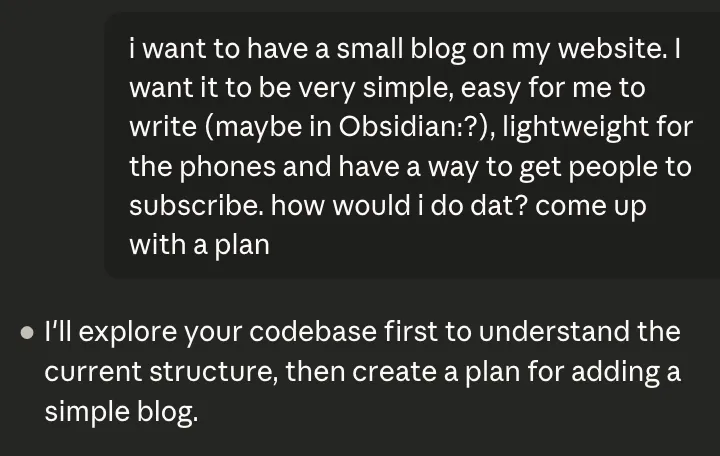
This was also the first time I actually used CC on my phone! I just connected my Github account, pointed it towards my websites repository and that was it.
Where we ended up
After a couple hours of haphazard prompting Claude Code and testing spread over 3 days, I have a blog! Here are some key highlights of where we ended up:
- Markdown files in my repo - I can create markdown files in Obsidian Vault in my repo and when I commit, they are published as blog posts. I can add images, any formatting available for Markdown, but most importantly, use the tool I already love - to write my blog posts!
- Buttondown for subscription - I still had to use a third-party SaaS tool for email subscriptions and I am not thrilled about that, but Buttondown works. The button to subscribe fits nicely on my personal website.
- Hosted on Vercel - Everything is hosted on Vercel. That makes it easy for me to manage. Could be a dumb decision if I get a lot of visitors, but so far that seems like a potentially good problem to have. I also get automatic analytics from Vercel which is what I need!
- Dark Mode - This is straightforward, but before the blog my website was aggressively light mode website. I like to read blogs at night, no one will want to read my blog at night if it hurts their eyes. It was one prompt and one follow-up suggestion for Opus 4.5 in Claude Code to add dark mode on my website.
- Claude Code as my editor - Another benefit of working in markdown files in my repo is that I can spin up Claude Code in seconds and ask it for feedback on my blog and get proofreading services!
My Obsidian Setup
If you haven't heard of Obsidian, sorry! I already mentioned it several times without explaining. It's a notes app with some interesting twists. It's not forcing you to lock-in within their walled garden, you are just editing markdown files (which almost any other tool can open). At the same time it's super customizable, has a massive plugin ecosystem, and is fast.
My Obsidian setup might seem basic to power users. But these simple automations make writing accessible for me.
- Templates - I use a template with a pre-filled date that's easy to duplicate
- New blog-post hotkey - Just start a new draft file in my drafts folder with cmd+n. No matter where I am or what I am doing in Obsidian. Then with cmd+ctrl+t I can add a template to this doc that will be parsed to HTML later.
- Folder structure - Publishing a blog post is just dragging my file from Drafts to the Blog folder and pushing changes to Github.
- Images - Adding an image to the blog-post is as simple as dragging a photo to the Obsidian file. Image Converter plugin does all the rest: converting it to webp, compressing it, writing the link in relative markdown format, and saving the photo in a pre-defined folder.
What's next
In my quest to becoming an ultimate Blogsidian-influencer, I think I can do build some more cool stuff to help me have more fun writing blogs. Some of the ideas I am exploring:
- Editor skill - I want to learn more about how Claude Code skills work and I believe an editor skill could be awesome. I would love an editor that checks how well I am communicating my ideas, and offers suggestions to fix grammar and styling errors. I like the idea of using the Claude Canvas plugin from David Siegel to display suggestions for fixes.
- Comment intern - Another idea I am exploring is to have an intern from Claude Code for my blog posts that can be triggered from comments. I want to leave comments in the draft blog-post in Obsidian that triggers my Claude Intern for researching and reviewing that specific line or paragraph. It feels much more natural to interact this way, rather than prompting in the terminal window all the time.
- Automate newsletter - Right now, I need to manually copy article to buttondown to send it as a newsletter. I believe if I automate having my blog posts available on RSS feed, then buttondown will also automatically send new posts as e-mails.
If anything got you interested and want to learn more - definitely reach out at niko.rekhviashvili@gmail.com. I will be more than happy to figure out what an open-source version of my Blogsidian looks like.